
Volunteer profile photos are visible to Five Rivers MetroParks staff within Get Connected and may also be visible to the public on our volunteer impact pages. More importantly, profile photos are printed on the official name badges that fully onboarded short-term and long-term volunteers wear during their service. Fully onboarded means that the volunteer has completed a Volunteer Profile, signed our Volunteer Handbook, and, for those 18 and up, completed a background check. Volunteer name badges help staff, other volunteers, and the public recognize you as a volunteer they can approach for assistance. Having an official volunteer name badge signals that you are a dedicated and reliable member of our team and a resource for support. If you do not currently have a profile photo added to your Get Connected volunteer account, here's how you can do it easily: 1. Log in to your Get Connected account. 2. Click the User Menu drop-down in the top right corner of your screen next to your initials and select "Edit Profile". 3. Click the blue "Upload My Account" button and select a clear and clean headshot from your photo files. 4. When directed to confirm your account click the blue "Continue with your Email Address" button. 5. Click the camera icon next to your name and email address. 6. Select "Click to Add" and select a clear and clean headshot from your photo files to serve as your volunteer profile photo. Center it in the frame. That's it! You've successfully uploaded your volunteer profile photo! You should now see your profile photo in the top right-hand corner of your screen next to your User Menu where your initials used to be. In that User Menu you can select, "View Profile" to view this change and any others you have made to your account. Now that you've added your profile photo successfully, you may want to go ahead and request a new While you're in the VIP Item Request Form, you may also want to select some new volunteer apparel or an updated milestone service pin. You can do it all easily in this one form! Did you know that Five Rivers MetroParks has a volunteer incentive program designed to recognize, appreciate, and encourage ongoing volunteer efforts? Active volunteers who serve 25 hours or more can qualify for volunteer apparel, milestone service pins, volunteer discounts, and more each year. We encourage volunteers to wear their volunteer apparel with pride each time they volunteer with us. Learn more about the volunteer incentive program, and start requesting your VIP Items including your volunteer name badge here. If you need any assistance, please do not hesitate to reach out to us - We're here to help you! We'll even take your volunteer profile photo for you and help you upload it at an upcoming Volunteer Open House. View the schedule and RSVP to meet with us in-person here. View more helpful Get Connected Tech Tips on our Volunteer Blog here. |
Volunteer Services Volunteer Services is available if you have questions or need assistance in signing up. Contact us at volunteer.services@metroparks.org or #937-275-7275.
|
|
Apr 28, 2026
|
by Volunteer Services
|
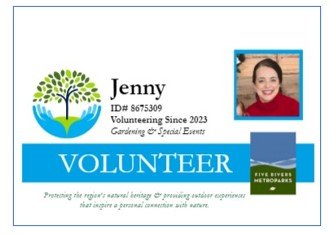 volunteer name badge. You can do that easily in our